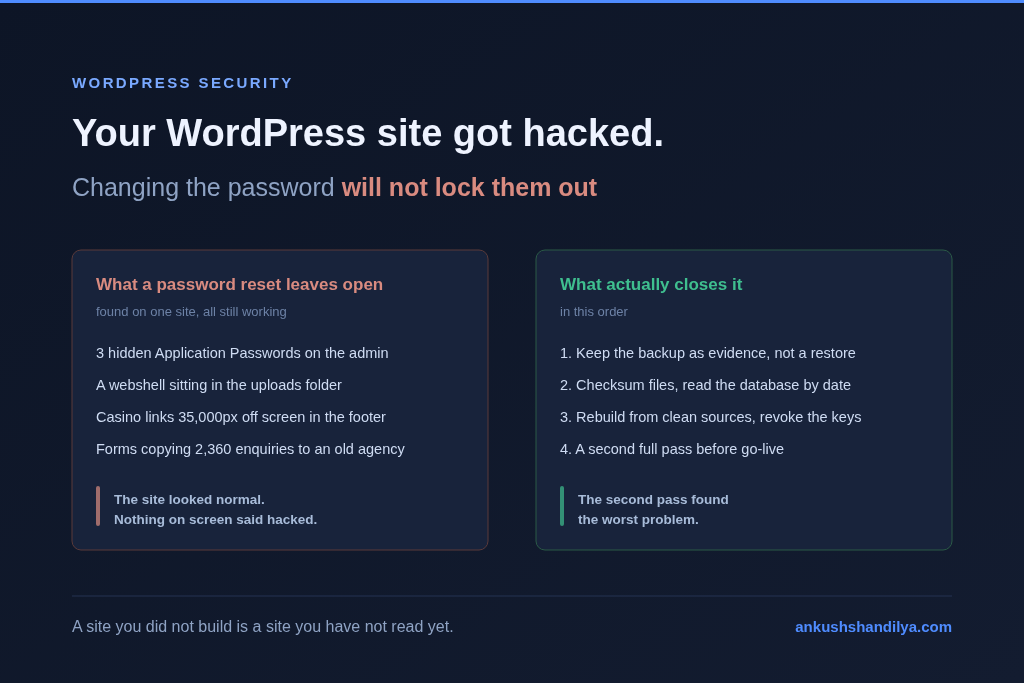
A hacked WordPress site is not fixed when you change the admin password. On a site I cleaned up recently, the attacker had planted three hidden “Application Passwords” on the administrator account. Those keys keep working after the password changes. A password reset would have felt like a fix and changed nothing.
This is how I investigated it, what I found, and what I did, step by step, so you can run the same checks on your own site.
The site
A small service business, running WordPress for about eight years. A previous agency built it and managed it for years. The owner moved to a new developer, and I got the job of taking it over. What I received was a full backup of files and database from the old host.
The site looked normal. The home page loaded, the forms worked, the design was intact. Nothing on screen said “hacked.”
Rule one: the backup is evidence, not a restore point
The first decision matters most. I did not restore the backup to a server and start clicking around. I treated it as untrusted evidence.
I imported it into a local copy on my own machine, and I blocked all outgoing mail from that copy before anything ran. A hacked site can send mail, and a cloned site can send real customers real emails. Then I started reading.
Step 1: check every file against a clean copy
WordPress core and every plugin from wordpress.org has an official checksum. Anything that does not match is either a local change or somebody else’s code.
wp core verify-checksums
wp plugin verify-checksums --all
Core was clean. Three plugins were not plugins at all. They were called “PA WordPress”, “WordPress InitHelper” and “Verificator Analyze”, and all three claimed “Author: Matt Mullenweg”, who co-founded WordPress and did not write these. All three were dated the same day in March. Each one wrote a small file-upload backdoor into the uploads folder, and put it back if it was deleted.
Then the uploads folder itself. Uploads should hold images and PDFs. It should never hold PHP.
find wp-content/uploads -name '*.php' ! -name index.phpThat found two files. One was the backdoor the fake plugins kept dropping. The other was lock360.php, a webshell. When called with the right parameters it downloaded PHP code from an outside server and ran it. That is full control of the server for whoever holds the URL.
Once you know a malware family, search for its fingerprints across the whole site, because droppers spread:
find . -name 'wp-cache-*.php' -o -name 'lock360.php' -o -name 'launch.php'
grep -rl '_drop_url' .
The theme was the one piece I could not checksum, because it was custom. I read it line by line. It was clean.
Step 2: read the database by date
Malware files are the loud part. The database is where the quiet damage lives.
I sorted every post by date. All the real content was from 2019 or earlier. Then, starting in February 2026, there were 77 new posts. Casino and gambling articles in French and Dutch, 74 of them published on a single day, all under the administrator account. They were live, in the sitemap, and visible to Google.
Spam posts tell you what happened. They do not tell you how the attacker keeps coming back. For that I checked the user meta table:
SELECT user_id, meta_key FROM wp_usermeta
WHERE meta_key IN ('_application_passwords', 'session_tokens');
That is where the real backdoor was. Three Application Passwords on the administrator account, all named “auto-bootstrap.” The first was created on 3 February. The second was created on 9 February, the same day the first spam post appeared. The third arrived in March.
Application Passwords are a real WordPress feature. They let an outside tool post to the site through the REST API without logging in. They are also separate from the account password. Change the password and they still work. Nothing in the normal admin screens draws attention to them. This is why I would not have trusted a password reset alone, and why I check this table first on every compromised site now.
Step 3: look for what visitors cannot see
The last trick was the cleverest. The attacker edited the footer text stored in the theme options and appended a block like this to 11 different fields:
<div style="position:absolute; left:-35255px;">
  ...casino links...
</div>
It pushes the links 35,000 pixels off screen. Visitors never see them. Search engines do. Because the footer appears on every page, every page on the site was quietly selling casino links.
The search that finds this is plain:
SELECT option_name FROM wp_options
WHERE option_value LIKE '%position:absolute%'
   OR option_value LIKE '%left:-%';
One more detail mattered here. The theme options framework keeps its own saved cache in a second row. If you clean the main row and miss the cache, the spam comes back on the next save. I cleaned the fields, kept the real address and phone text exactly as they were, and reset the cache.
I also fetched the live home page twice, once as a normal browser and once as Googlebot, and compared them. Some infections show spam only to search engines. This one did not, and the two copies matched.
Step 4: rebuild, do not scrub
At this point I had a choice. Scrub the infected copy file by file, or rebuild from clean sources and bring across only what I had verified.
I rebuilt. A fresh WordPress install. Every plugin downloaded fresh from wordpress.org, nothing reused from the backup. The theme, which I had read and trusted, carried over and updated to run on PHP 8, because it no longer worked on current server software. I have written before about what that kind of legacy PHP upgrade really costs, and this was a small version of the same job.
Then the media library. 6,139 images and PDFs. I checked that every single file was really an image or a PDF by its content, not by its file name, and that none carried hidden code. All 6,139 came across.
I also removed 12 plugins the site did not need, including two old remote-management tools that still held access keys. Every unused plugin is another door. The site went from about 1.1 GB to about 570 MB.
Step 5: close the doors the attacker used
Cleaning without hardening invites a repeat. These five changes cover the routes this attacker used and the common ones next to them:
- Uploaded files can no longer run as PHP. That is exactly how the webshell worked.
- Application Passwords are switched off, since nothing on the site needs them.
- XML-RPC and user name discovery are blocked.
- The built-in theme and plugin code editor is disabled.
- New security keys in
wp-config.php, which logs everyone out.
Turning off Application Passwords is one line in a small must-use plugin:
add_filter( 'wp_is_application_passwords_available', '__return_false' );And the old administrator account, the one the attacker had taken over, was deleted. Two new administrator accounts belong to the people who actually own the business.
The second pass found the worst problem
Before go-live, I audited the whole thing again from the top. The files were clean on the second pass. The database was not.
Both contact forms were set to send every enquiry to the business and also to the previous agency’s mailbox, one as a direct recipient and one as a hidden BCC. A custom pricing tool on the site did the same. Customer names, emails, phone numbers, addresses, everything a customer typed.
The stored copies alone went back eight years and added up to at least 2,360 customer enquiries copied to someone who no longer worked for the business. The real number is higher, because the forms kept mailing after the site stopped storing copies.
This was not the attacker. It was a configuration. I cannot say why it was set up that way, and I am not going to guess. But the owner did not know, and as far as I could tell it was still happening on the live site the day I found it. My first pass missed it because my local copy blocked all mail, so the forms looked fine in testing. That is the honest reason I always do a second full pass before anything goes live.
The same audit found the rest of the ownership picture. The only administrator account was an agency account. The site’s admin email, where password resets and security alerts go, was an agency address. Google Analytics was sending the visitor data to the agency’s account. The owner was only an editor on their own website.
I fixed all of it. The forms now mail only the business. The admin email, the analytics and the accounts belong to the owner. The old host was shut down, which stopped the leak for good.
A 10-minute check for your own WordPress site
You do not need a developer to start. Most of this is visible in wp-admin.
- Users > All Users. Who are the administrators? Every one should be a person you know and trust today.
- Users > Profile > Application Passwords on each administrator. If there are keys and you do not know what uses them, revoke them.
- Settings > General > Administration Email Address. It should be yours.
- Your contact forms. Open the mail settings of each form and read the To, CC and BCC lines. Every address should be one you own.
- Plugins. Delete anything you do not actively use, especially old backup and remote-management plugins.
- Search Google for
site:yourdomain.com casino. If anything comes back, you have the same problem.
If any of these surprise you, take a full backup first, keep it as evidence, and then fix from clean sources rather than scrubbing in place.
What this job reminded me
The visible damage took a day to understand. The hidden part took a second pass. Most of the value was in the second part: a backdoor that would survive a password change, and a form setting that sent eight years of customer enquiries out of the business.
This is why I modernize inherited systems in careful passes instead of rewriting them. You only fix what you have actually read.
A site you did not build is a site you have not read yet. Read it before you trust it.