Email is the backbone of most SaaS products. Onboarding, password resets, reward campaigns, billing notices. When it works, nobody notices. When it fails, a user does not get the one message that mattered, and you find out from a support ticket instead of a log. I have built and run the email engine behind a high-volume SaaS for years, and reliable email is never about “sending the message.” It is about the queue around it.
The short version
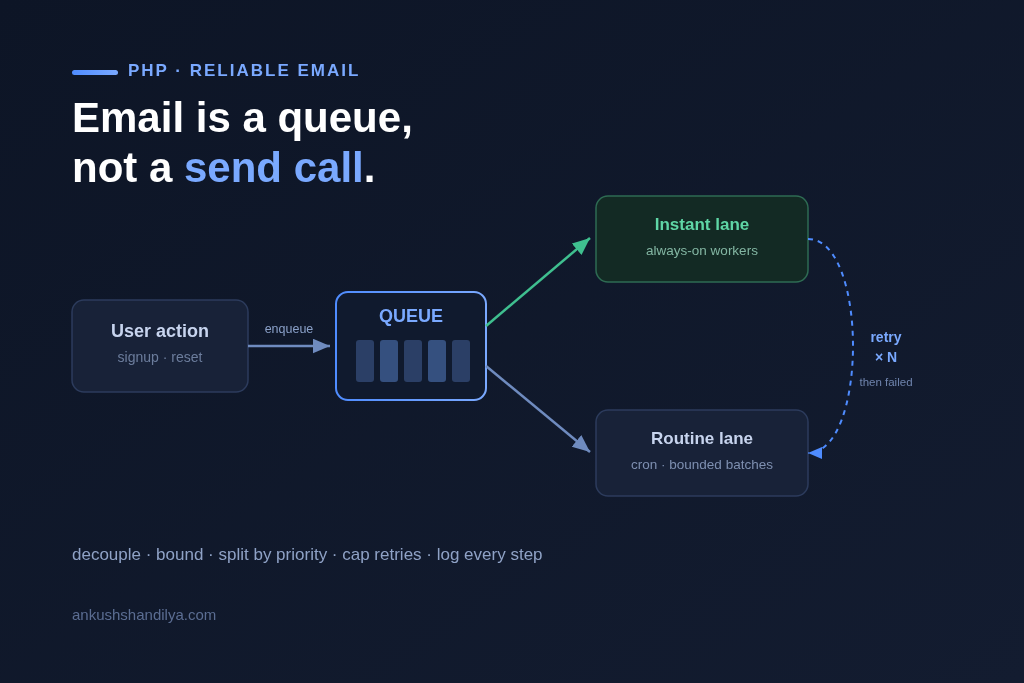
A reliable PHP email system is a controlled pipeline, not a send call. You decouple the send from the user action, process jobs in bounded batches, separate instant jobs from routine ones, retry failures a fixed number of times, and log every step so a failure tells you why. Get those five things right and email stops being the thing that silently breaks. The rest of this post is each one, and why it matters.
Why sending email inline is the bug
The first version of email in almost every product sends the message right inside the user action. The user signs up, and the same request that creates their account also calls the SMTP server and waits.
That works until it does not. SMTP servers rate-limit and time out. A slow mail server now means a slow signup. A burst of activity means thousands of synchronous sends fighting for memory and execution time, and PHP’s max execution limit kills the request halfway. Worst of all, if the send fails, the user action it was bolted onto either fails with it or silently loses the email.
So the first rule is simple. Do not send email inside the user event. Queue it.
The pattern: a queue service, not a send function
I abstract the whole workflow into a dedicated queue service. The user action does one cheap thing: it writes a job to the queue and returns. A separate process drains the queue and does the actual sending, out of band, where it can take its time and fail safely.
That separation is the entire foundation. Once the send is decoupled from the request, every hard problem below becomes solvable, because the sending now happens somewhere you control instead of inside a user’s page load. This is the same principle I follow when modernizing a legacy SaaS without a rewrite: move risky work out of the path where it can hurt a user, into a place you can observe and control.
Bounded batches and time limits
A queue worker that tries to send everything in one pass will eventually hit a batch big enough to blow past PHP’s execution time or memory limit, and die mid-run. So every run is bounded.
I give each run a configurable batch size and a maximum execution time, set comfortably under the host’s hard limit. The worker sends until it hits the batch size or runs low on time, then stops cleanly and lets the next run pick up where it left off. The queue drains in predictable, survivable chunks instead of one fragile marathon. This matters most on shared or cron-constrained hosting, where a 60-second wall is real and unforgiving.
Separate the instant jobs from the routine ones
Not all email is equal. A password reset needs to go now. A weekly campaign to fifty thousand users does not, and must not block the password reset behind it.
So I split the queue into two lanes. Instant jobs, triggered by a real-time user action, are processed by always-on workers so they go out in seconds. Regular jobs, the batched periodic campaigns, are processed by cron on a steady cadence. The high-priority lane stays responsive no matter how large the routine backlog gets. One overloaded campaign can never delay the message a user is actually waiting on.
Retries with a hard ceiling
Failures are normal. A mail server hiccups, an API times out, a recipient’s server is briefly down. The wrong response is to retry forever, which turns one stuck job into an infinite loop that clogs the queue.
So every failed job is retried a fixed number of times, then marked as permanently failed with the error attached. A small retry count absorbs the transient failures, which are most of them. The hard ceiling means a genuinely undeliverable message gets recorded and set aside instead of looping forever. The queue keeps moving, and you have a clean list of what actually failed and why.
Logging that tells a story
The difference between a system you can operate and one you dread is the logs. Most email code logs nothing, or logs “sent” and “error” with no context. When something goes wrong at 2am, that tells you nothing.
I log every step with full context: when a job was enqueued, which batch it ran in, whether it was instant or routine, how long it took, and on failure, the exact error. Good logs are not a record of events. They are a story you can read backwards from a symptom to a cause. When a user says “I never got the email,” I can answer in one query instead of a guessing game. The same visibility principle applies to performance work generally, the way good caching depends on understanding where time is actually spent before you optimize.
Frequently asked questions
Why should email sending be queued instead of sent directly in PHP? Because sending inline ties the email to the user’s request. SMTP rate limits, timeouts, and PHP’s execution limit turn a slow mail server into a slow or failed user action. Queuing decouples the send so it happens out of band, where it can take its time, retry safely, and never block the user.
How do you stop a PHP email worker from timing out on large batches? Bound every run. Give the worker a batch size and a maximum execution time set under the host’s hard limit. It processes until it hits either, stops cleanly, and the next run continues. The queue drains in predictable chunks instead of one long run that risks dying halfway.
How should failed emails be retried? Retry a fixed, small number of times to absorb transient failures, then mark the job permanently failed with the error recorded. Retrying forever clogs the queue with undeliverable messages. A hard ceiling keeps the queue moving and gives you a clean list of real failures.
How do you keep urgent emails fast when there is a large campaign running? Split the queue into two lanes. Instant jobs from real-time user actions go to always-on workers; routine batched campaigns go to cron. The urgent lane stays responsive regardless of how large the campaign backlog is, so a password reset never waits behind a newsletter.
The takeaway
Reliable email in PHP is not a library you install or a send function you call. It is a queue you design: decoupled from the user action, processed in bounded batches, split by priority, retried with a ceiling, and logged so every failure explains itself. Build that once and email moves from your most fragile surface to one you never think about, which is exactly where it should be.