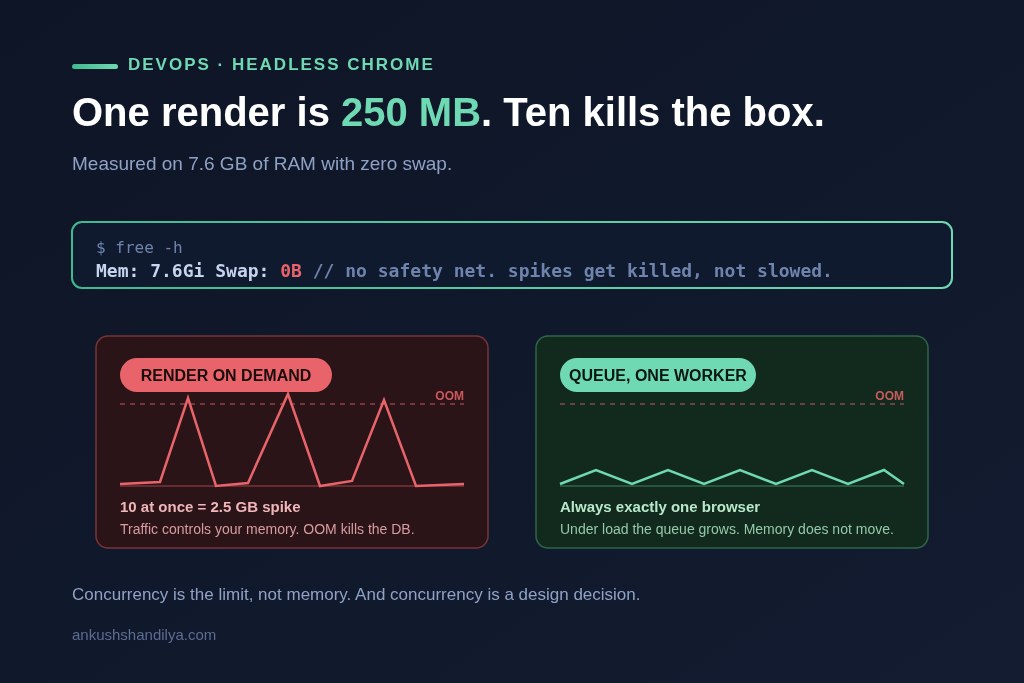
One headless Chrome render costs about 250 MB of memory for roughly one second, then returns to baseline. That is the number I measured on a 7.6 GB staging box with zero swap, and it is the number that decides whether you can put server-side image rendering on a small server at all.
I needed that answer before designing a thumbnail rendering pipeline, and the reason I needed it turned out to be a ticket that guessed the wrong cause. Getting it meant installing Chrome on a box that other things depend on, which is where most tutorials will walk you into a wall. Here is what actually happens, including the two traps that would have caused real damage.
Why zero swap changes everything
Check this before anything else:
free -h
If the swap row reads 0B, you are working without a safety net. On a box with swap, a memory spike gets slow. On a box without swap, a memory spike gets fatal. The kernel’s out-of-memory killer picks a process and terminates it, and it tends to pick the biggest one, which on an application server is usually your database.
So on a zero-swap box, “Chrome sometimes uses a lot of memory” is not a performance note. It is a database outage waiting for the right moment.
That single fact drove every decision below.
Look before you install
I ran read-only checks first and installed nothing until I knew what I was standing on. This is the same discipline as hotfix-ing production without breaking staging: on a live box, look before you touch.
cat /etc/os-release
node -v
which -a node chromium chromium-browser google-chrome
free -h
df -h
This is not caution for its own sake. Both traps I hit were visible in the output of those commands, before I had changed a single thing on the machine.
Trap one, the Node version that is not the Node version
Running node -v as root reported Node 14. Far too old for current browser automation tooling.
The obvious move is to upgrade the system Node. That move is how you take down an application you were not thinking about. Other services on the box are running against that Node, and nothing warns you.
The output of which -a told the real story. The application user, runcloud in this case, already had Node 20 through nvm. The system Node and the application Node were two different installations, and only the root shell was seeing the old one.
So the rule became: run everything as the application user, never as root, and do not touch the system Node at all. The version you get from a root shell is frequently not the version your application runs on. Check as the user that will actually execute the code.
Trap two, apt quietly installing snap
The obvious install command on Ubuntu is:
apt install chromium-browser
On modern Ubuntu that package is a shim. It pulls in snapd and installs Chromium as a snap. Snap-packaged Chrome runs inside a confinement layer that routinely breaks headless automation, in ways that produce confusing errors rather than clear ones. You will be debugging your own code for a day before you discover the packaging is the problem.
I caught it because I dry-ran the install and read what it wanted to pull:
apt-get install --dry-run chromium-browser
If snapd appears in that output, stop. Do not run it without the flag.
The clean alternative is Google’s Chrome for Testing. It is a plain versioned binary, published specifically for automation, with no snap and no apt entanglement. You download a known version and put it where you want it. Nothing else on the server is touched, and nothing else on the server can break it later with an unrelated update.
Chrome will not launch on a fresh server
Download it, run it, and it fails immediately. A fresh server image is missing roughly a dozen shared libraries Chrome expects, because they normally arrive with a desktop environment nobody installed here.
Do not guess at the list. Ask the binary:
ldd ./chrome | grep "not found"
That prints exactly which libraries are missing. Install those, and nothing else.
Then install fonts, which is the step people skip. Without fonts installed, Chrome still runs and still produces images, so nothing looks broken. The images just render in a fallback typeface. If you are generating anything a user will see, that is a silent correctness bug, and you will find it in production rather than in testing.
The flags that matter on a server
--headless=new
--no-sandbox
--disable-dev-shm-usage
--headless=new runs the modern headless mode with no display attached.
--no-sandbox is required when running in a container or as a service user without the kernel permissions the sandbox needs. Only use it when you control the content being rendered. Rendering your own application’s HTML is fine. Rendering arbitrary user-supplied URLs with the sandbox off is not, and the answer there is to fix the permissions rather than drop the flag.
--disable-dev-shm-usage is not optional on a small box. Chrome puts shared memory in /dev/shm, which is commonly capped at 64 MB on servers and containers. Exceed it and Chrome crashes with an error that does not mention shared memory. This flag moves that allocation to a normal temp directory instead.
You will also see dbus and UPower errors printed on every launch. Those are Chrome looking for desktop services that do not exist on a server. They are noise. Ignore them and do not spend an afternoon on them like I nearly did.
The measurement, and what it actually means
I measured a single render on the real hardware, not on my laptop, because a laptop measurement of server behaviour is not evidence of anything.
About 250 MB of resident memory, for roughly one second, then back to baseline.
The cost of one render is nothing. On a 7.6 GB box, one render is background noise. The number that should worry you is not one render, it is ten. Ten concurrent renders is a 2.5 GB spike, and on a zero-swap machine that is where the out-of-memory killer picks a process and something important dies.
So the constraint is not memory per render. It is concurrency. And concurrency is a design decision, not a hardware limit.
The design that makes the number safe
Two rules, and they are the whole architecture:
Never render on demand. A render triggered directly by a web request means your memory usage is controlled by your traffic, which you do not control.
Never render in parallel. Renders go on a queue, and the worker processes exactly one at a time. This is the same shape as a reliable email queue in PHP, for the same reason: the queue is what turns unbounded concurrency into a number you chose.
With one worker, memory cost is constant. Whether one person saves or five hundred people save in the same minute, the server is running exactly one browser. Under load the queue gets longer, and the memory usage does not move.
The thing you trade away is immediacy. Images arrive a couple of seconds behind the action instead of instantly. For a preview thumbnail that is completely fine, and it is a very good price for never having to think about an out-of-memory kill again.
If you genuinely need more throughput later, raise the worker count deliberately, one at a time, with the 250 MB figure in hand. Two workers is 500 MB of ceiling. That is a decision you make with a number, not a default you inherit.
The short version
Check free -h for swap before you plan anything, because zero swap turns memory spikes into process kills. Check the Node version as the application user, not as root. Dry-run any apt install and refuse it if snapd appears, using Chrome for Testing instead. Use ldd to find the missing libraries rather than guessing, and install fonts or your images render in the wrong typeface without telling you. Set --disable-dev-shm-usage or Chrome will crash on a small box for reasons it will not explain.
Then measure one render on the real hardware, and use that number to pick a worker count. One render is cheap on almost any server. Ten at once is what kills it, and the queue is what makes sure ten at once never happens.